
Creating barcodes programmatically is a frequent requirement when you need to embed product identifiers, inventory codes, or tracking numbers directly into your software. Aspose.BarCode for Python via .NET provides a robust SDK that simplifies barcode creation across many symbologies, including Code 93. This guide walks you through the entire process of building a Code 93 barcode generator in Python, from environment setup to performance tuning, so you can integrate reliable barcodes into your applications with confidence.
Steps to Generate Code 93 Barcodes Using Python
- Install the SDK: Run
pip install aspose-barcode-for-python-via-netto add the library to your project. - Create a BarCodeGenerator instance: Initialize the generator with
EncodeTypes.Code93to specify the Code 93 symbology. - Set the barcode text: Provide the data you want to encode, ensuring it complies with Code 93 character rules.
- Configure visual properties: Adjust size, colors, and resolution to match your UI requirements.
- Save the image: Call the
savemethod to write the barcode to a PNG file.
For detailed API information, see the BarCodeGenerator class reference.
Code 93 Barcode Generation - Complete Code Example
The following example demonstrates how to generate a Code 93 barcode, customize its appearance, and save it as a PNG image.
# Complete working code for generating a Code 93 barcode with Aspose.BarCode for Python via .NET

import aspose.barcode as barcode
from aspose.barcode import generation
from aspose.pydrawing import Color

# Initialize the barcode generator with Code 93 symbology
generator = generation.BarcodeGenerator(generation.EncodeTypes.CODE93)

# Set the data to be encoded (must be alphanumeric)
generator.code_text = "ABC-1234-XYZ"

# Optional visual customizations
generator.parameters.barcode.x_dimension.pixels = 2.0          # Width of the smallest bar (in points)
generator.parameters.barcode.bar_height.pixels = 100           # Height of the barcode (in points)
generator.parameters.barcode.bar_color = Color.black   # Bar color
generator.parameters.back_color = Color.white   # Background color

# Save the barcode as a PNG image
output_path = "output/code93_barcode.png"
generator.save(output_path, generation.BarCodeImageFormat.PNG)

print(f"Barcode saved to {output_path}")
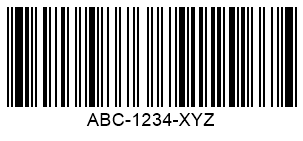
Note: This code example demonstrates the core functionality. Before using it in your project, make sure to update the file paths (
code93_barcode.png, etc.) to match your actual file locations, verify that all required dependencies are properly installed, and test thoroughly in your development environment. If you encounter any issues, please refer to the official documentation or reach out to the support team for assistance.
Installation and Setup in Python
- Install the package
pip install aspose-barcode-for-python-via-net - Download the native .NET binaries from the download page. Extract the archive and ensure the DLLs are accessible to your Python runtime (add the folder to
PATHor place the files beside your script). - Apply a license (optional for evaluation)A temporary license can be obtained from the temporary license page. For production use, purchase a full license via the pricing page.
from aspose.barcode import License
license = License()
license.set_license("Aspose.BarCode.lic")
Aspose.BarCode Features That Matter For This Task
- Wide symbology support: Includes Code 93, Code 128, QR, DataMatrix, and more.
- High‑resolution rendering: Generates vector and raster images suitable for printing or screen display.
- Customizable appearance: Control dimensions, colors, margins, and text placement.
- Cross‑platform output: PNG, JPEG, BMP, GIF, TIFF, and PDF formats are all supported.
- Performance‑optimized engine: Designed for batch processing and low memory footprint.
These capabilities make Aspose.BarCode the ideal choice for creating reliable Code 93 barcodes in Python applications.
Configuring Code 93 Barcode Parameters
When working with Code 93, you may need to fine‑tune several parameters:
code_text: The data string; must be alphanumeric and can include special characters defined by the Code 93 specification.x_dimension: Controls the width of the narrowest bar; typical values range from 1.0 to 3.0 points.bar_height: Sets the overall height of the barcode; adjust based on printing requirements.fore_color/back_color: Define bar and background colors usingColorobjects.resolution: When saving to raster formats, you can specify DPI via theresolutionargument of thesavemethod.
Example of setting these options is shown in the complete code snippet above.
Performance Considerations for Barcode Generation
- Reuse the generator: If you need to create many barcodes, instantiate a single
BarCodeGeneratorobject and only change thecode_textand visual properties between saves. This reduces object‑creation overhead. - Batch processing: Loop through your data set and call
savewith different file names; avoid writing to disk inside tight loops if you can keep images in memory. - Memory management: Dispose of large images promptly by deleting references or using
withstatements when working with streams. - Parallel execution: For massive workloads, consider generating barcodes in parallel processes, but ensure each process loads its own copy of the native DLLs.
Following these tips helps maintain low latency and minimal memory usage even when generating thousands of barcodes.
Best Practices for Generating Code 93 Barcodes in Python
- Validate input data before passing it to the generator to avoid runtime exceptions caused by unsupported characters.
- Standardize dimensions across your application to ensure consistent scanning performance.
- Use PNG for web and screen display, but switch to PDF or SVG when you need vector scalability for print.
- Apply a license early in development to avoid evaluation limitations and to test the exact behavior of the licensed version.
- Log generation results (file path, data string, timestamp) to simplify troubleshooting and audit trails.
Implementing these practices will result in more maintainable code and higher-quality barcode outputs.
Conclusion
Building a Code 93 barcode generator in Python is straightforward with Aspose.BarCode for Python via .NET. By following the steps, reviewing the complete example, and applying the configuration and performance recommendations, you can embed high‑quality barcodes into any Python‑based system. Remember to acquire a proper license for production use; a temporary license is available on the temporary license page, and full licensing details are listed on the pricing page. Start generating barcodes today and streamline your data‑capture workflows.
FAQs
How do I build code 93 barcode generator in Python using Aspose.BarCode?
Use theBarcodeGeneratorclass, setEncodeTypes.CODE93, assign your data tocode_text, configure visual settings, and callsave. The complete code example above illustrates the process.Which Python imaging libraries can I combine with Aspose.BarCode?
While Aspose.BarCode creates the image internally, you can further manipulate the PNG with libraries such as Pillow, OpenCV, or Matplotlib for tasks like adding overlays or converting formats.Can I change the barcode size and colors programmatically?
Yes. Adjust properties likex_dimension,bar_height,fore_color, andback_coloron theBarcodeGeneratorinstance before saving the image.Do I need a license for commercial projects?
A temporary license is free for evaluation via the temporary license page. For production deployments, purchase a full license from the pricing page.