Web pages often contain tabular data such as reports, price lists, or statistics in HTML tables. Converting these tables to Excel enables sorting, filtering, and calculations. Automating the conversion with Python improves accuracy and saves time, especially for large or repetitive datasets. This guide shows how to convert HTML to Excel in Python with just a few lines of code.
Python HTML to Excel Converter Library
Aspose.Cells for Python via .NET is a high‑performance spreadsheet library that lets Python developers create, edit, and convert Excel files without Microsoft Excel.
It reads and writes many formats, including XLS, XLSX, CSV, HTML, ODS, and more. You can also work with formulas, formatting, charts, and complex spreadsheets programmatically. This makes it ideal for converting HTML reports, invoices, or tables into Excel workbooks.
Download the library from the releases page or install it from PyPI. Run the command below:
pip install aspose-cells-python
The package and its dependencies are then ready for any Python project.
Convert HTML to Excel in Python
Aspose.Cells can convert an HTML file or string directly into an Excel workbook. You can then save the workbook as XLSX, XLS, or another supported format.
Follow these steps to load HTML and save it as Excel:
- Load the HTML file using the
Workbookclass. - Save the workbook in XLSX format.
The code sample below loads an HTML file and exports it to Excel.
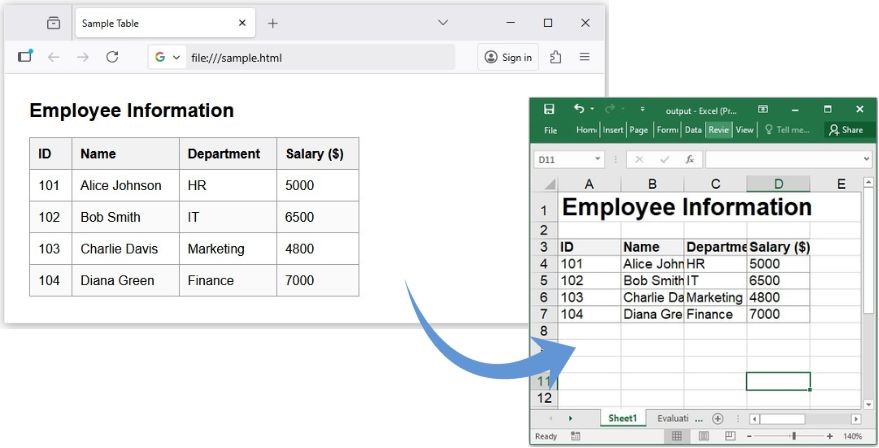
Convert HTML to Excel using Python.
Convert HTML String to Excel
When HTML content exists only in memory, you can convert it without writing a file first. This approach is useful for web‑scraping or dynamic data extraction scripts.
Steps:
- Create a memory stream that contains the HTML string.
- Initialize a
Workbookwith the stream. - Save the workbook as an Excel file.
The following example shows how to export an HTML string to an Excel worksheet:

Convert HTML String to Excel using Python.
Advanced Options for HTML to Excel Conversion
Aspose.Cells offers fine‑grained control over HTML loading and Excel saving. Use the HtmlLoadOptions class to manage images, formatting, and encoding.
Steps:
- Create an
HtmlLoadOptionsinstance. - Set the desired options (e.g., auto‑fit columns, preserve styles).
- Load the HTML with these options using
Workbook. - Save the workbook with
save().
The code example demonstrates how to apply custom load options before saving to Excel.
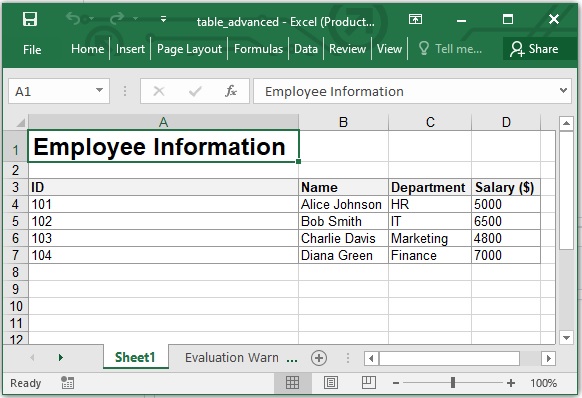
Advanced Options for HTML to Excel Conversion.
When to use load options
- Large tables or merged cells are present.
- You need to keep column widths and styles.
- Auto‑adjusting the layout improves readability.
Convert HTML to Multiple Excel Formats
Aspose.Cells can save the result in various spreadsheet formats to fit different pipelines or dashboards.
Get a Free License
Evaluate Aspose.Cells for Python via .NET without limits. Request a temporary license from the Aspose License Page. Apply it in your code to unlock premium features such as large‑file handling, advanced formatting, and chart manipulation.
Convert HTML to Excel Online
If you prefer a no‑code solution, try the Aspose.Cells HTML to Excel online converter.
The web app runs in your browser and supports HTML, XLS, XLSX, CSV, and ODS. Upload a file, choose the output format, and download the Excel file instantly.
Python HTML to Excel: Free Resources
Aspose.Cells for Python via .NET also supports file conversions, chart generation, formulas, formatting, and pivot tables. Explore these resources for deeper learning:
- Aspose.Cells for Python Official Documentation
- API Reference
- Free Online Excel Tools
- Developer Tutorials & Guides
Conclusion
Converting HTML to Excel in Python brings web‑based data into your analytics or reporting workflow. With Aspose.Cells, the conversion requires only a few lines of code while preserving formatting, accuracy, and performance. Whether you are building a data‑processing script or integrating web reports into Excel dashboards, Aspose.Cells provides all the tools you need.
Have a question or need technical help? Visit our Free Support Forum to connect with experts. Our team is ready to help you resolve issues and guide your project.
Frequently Asked Questions (FAQs)
1. Can I convert HTML directly to Excel using Python?
Yes. You can convert any HTML file or string containing table data directly to Excel using the Aspose.Cells for Python via .NET library. It reads the HTML structure and preserves tables, formatting, and styles in the output Excel file.
2. Does Aspose.Cells support converting HTML strings to Excel?
Absolutely. You can load HTML content from a string or memory stream instead of a file. This is useful when HTML is dynamically generated from web data, APIs, or user input.
3. What output formats are supported besides XLSX?
In addition to XLSX, you can export your HTML to XLS, CSV, ODS, PDF, and other formats supported by Aspose.Cells. You simply need to specify the desired SaveFormat when saving the workbook.
4. Do I need Microsoft Excel installed to use Aspose.Cells?
No. Aspose.Cells is a standalone Python library that does not depend on Microsoft Excel or Office. You can perform all conversions programmatically on any system.
5. Is there an online tool to convert HTML to Excel without coding?
Yes, Aspose offers a free HTML to Excel online converter where you can upload an HTML file and instantly download the Excel output.
6. Can Aspose.Cells handle large or complex HTML tables?
Yes. Aspose.Cells is designed for high‑performance data processing. It efficiently handles large HTML files containing multiple tables, images, or complex layouts, ensuring accurate Excel output.