About XenTek Limited

XenTek is a small software house that mainly develops Plan Runner – a tool for Project Managers. The company has one employee, Jonathan Tooth, an experienced developer, analyst, and consultant with over 30 years of commercial experience ranging from Z80 machine code to C#, VB.Net.
Problem
Plan Runner provides a high level of control and visibility for running projects. It needs to accept project plans created by managers. To do this, the tool offers two ways to input existing plans: a sync tool inside Microsoft Project and an import/export tool on the website for users who cannot install software. The import/export feature requires a reliable way to read and write Microsoft Project files.
Solution
Three options were evaluated during development. Microsoft Interop and MPXJ were rejected for licensing and compatibility issues. The third option, Aspose.Tasks for .NET, was chosen despite its license cost because it offers a commercially supported, up‑to‑date solution.
Plan Runner users interact with a simple interface, as shown below:
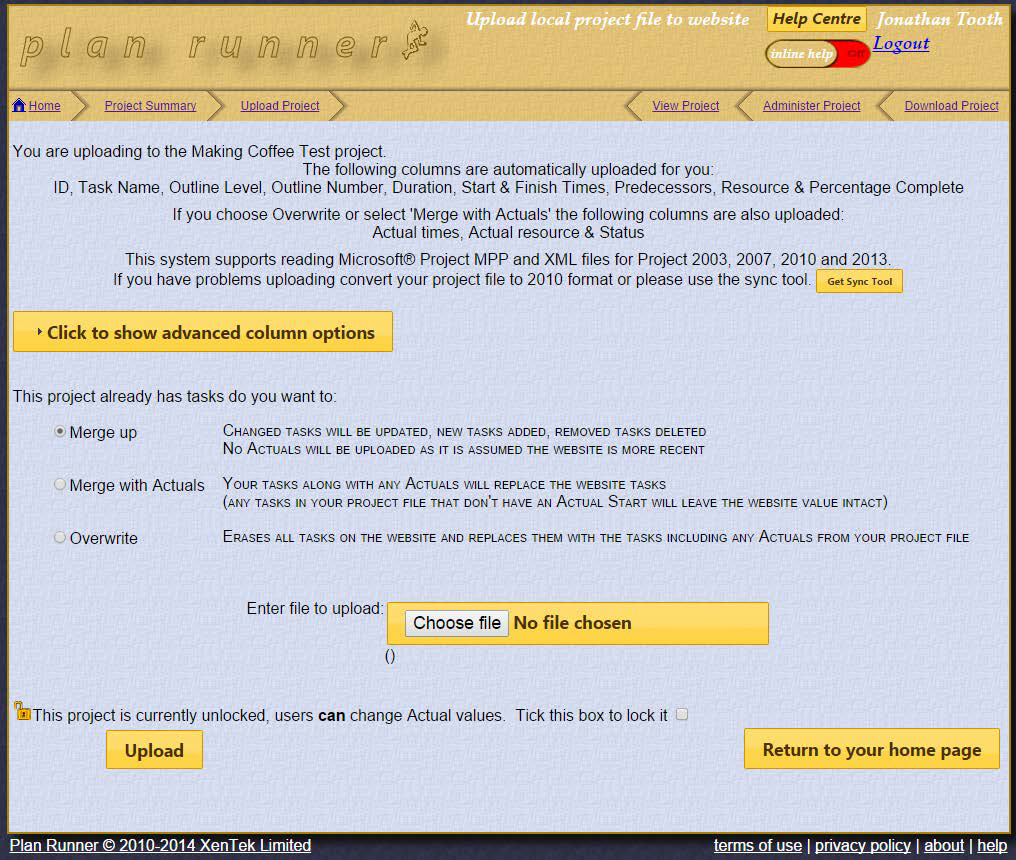
Image 1:- Project file upload page
Upload
Users upload their project plan by selecting a file and clicking Upload. The website reads the file and stores the selected data in a SQL Server database. Users can then merge the new data with existing content or overwrite it.
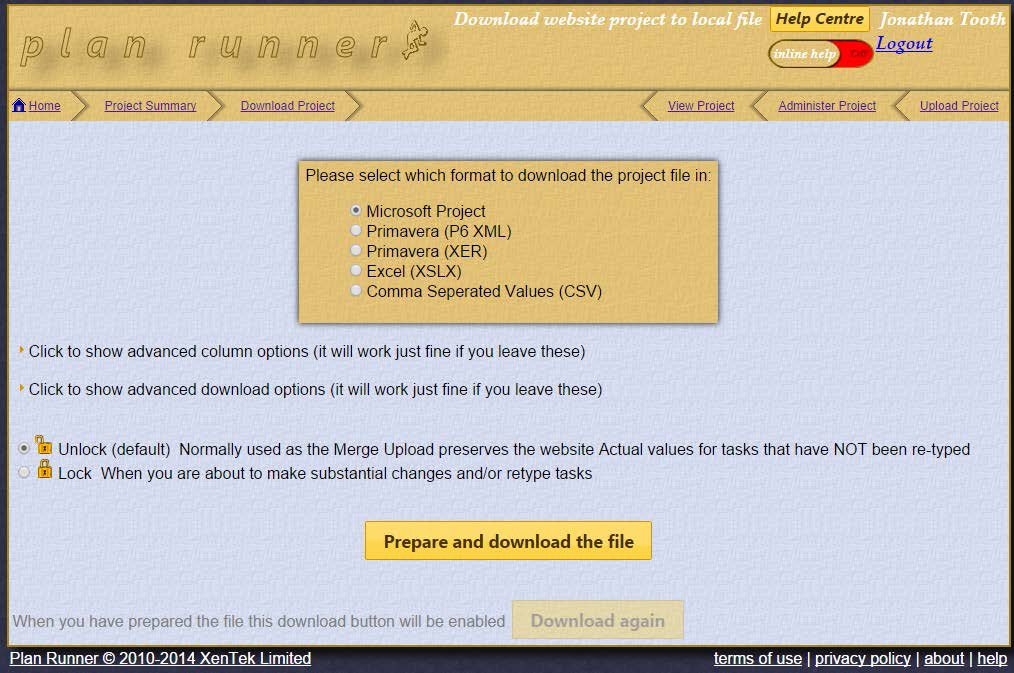
Image 2:- Project file download page
Download
The website can insert additional information into the original file and provide it back to the user. Clicking Prepare and download the file updates the uploaded project and returns the modified file.
Experience
Finding a solution
Initially, Microsoft Interop assemblies were used to read and write Project files. This worked for internal sites but violated Microsoft licensing on public websites.
Next, MPXJ – an open‑source library – was tried. It struggled with Microsoft Project 2013 files, causing incorrect data for our first customer.
Finally, we trialed Aspose.Tasks for .NET with a free trial to reduce risk. We measured:
- Ease of integration
- Product reliability
- Performance
- Quality of help
- Availability of support
Implementation
Effort
Integrating Aspose.Tasks for .NET into the import/export workflow required:
- Coding and unit testing Upload – 7 h
- System testing and bug fixing – 7 h
- Coding and unit testing Download – 5 h
- System testing and bug fixing – 7 h
- User Acceptance Testing – 6.5 h
Total effort: 32.5 hours.
A rough comparison with MPXJ shows that MPXJ coding took ~10 h, but testing and debugging exceeded 40 h. We recommend Aspose.Tasks for .NET over MPXJ.
Technical Solution
Previous mechanisms helped simplify the integration. While working with MPXJ, we isolated all file I/O into a shared library and created a ‘Neutral Task’ class to hide tool‑specific code.
Sample code to read a task name:
Public ReadOnly Property Name() As String
  Get
    Select Case cGlobals.ActiveImportExportMechanism
      Case cGlobals.ImportExportMechanism.UseMPXJ
        Return _TaskMPXJ.Name
      Case cGlobals.ImportExportMechanism.UseMicrosoft_OfficeInterop
        Return _TaskMSP.Name
      Case cGlobals.ImportExportMechanism.UseAsposeTasks
        Return _TaskAspose.Name
      Case Else
        Return String.Empty
    End Select
  End Get
End Property
Some fields, such as Predecessors and Duration, required extra conversion logic.
We exposed three overloaded methods to set task fields:
Public Function SetFieldValue(ByVal task As Aspose.Tasks.Task, ByVal eFieldName As AsposeFieldNames, ByVal Value As String) As Boolean

Public Function SetFieldValue(ByVal task As Aspose.Tasks.Task, ByVal eFieldName As AsposeFieldNames, ByVal Value As DateTime) As Boolean

Public Function SetFieldValue(ByVal task As Aspose.Tasks.Task, ByVal eFieldName As AsposeFieldNames, ByVal Value As Integer) As Boolean
Plan Runner does not use calendars, resource scheduling, or project information, so those features were omitted.
Challenges
The initial import/export code was straightforward thanks to examples on the ExamplesDashboard and the online help. Creating a new project file for download introduced issues with start and finish times. The forums and the documentation (especially the blank project file guide) helped resolve these problems. Appendix 1 offers additional guidance.
Outcome
Import and export of MPP files worked with more than 20 project files across various Microsoft Project versions. Export to CSV was re‑implemented directly from the PlanRunner database, avoiding unnecessary use of Microsoft Project. Export to Excel encountered compatibility problems with Excel 2010, so the feature was temporarily disabled.
Next Steps
Aspose.Tasks for .NET continues to meet our needs. Future work includes handling edge cases, fixing remaining bugs, and removing legacy Interop code to support additional formats offered by Aspose.Tasks.
Summary
The implementation proceeded smoothly. Aspose.Tasks proved robust, performed well, and remained stable after coding. It handled Project files from 2007 to 2013, and extensive testing confirmed accurate reading and writing of task fields. Once users test their own files with the new mechanism, we expect to finalize this component.
I recommend Aspose.Tasks for .NET to anyone needing reliable read/write access to Microsoft Project files.
Appendix 1 – Recommendations on creating a new task
When creating a new task, start‑time and finish‑time issues can arise. Follow these steps:
- Set Duration first
- Then set Work, RemainingWork, RegularWork, and Work again to match the duration
- Set DurationFormat
- Set Start, ManualStart, Finish, and ManualFinish
To assign resources, use:
Resource = mppFile.AddResource(resourceName)
Avoid:
Resource = New Aspose.Tasks.Resource mppFile.Resources.Add(resource)
Microsoft Project automatically assigns times to resource assignments; with Aspose.Tasks you must set them manually.
How to assign a resource:
Dim ra As New ResourceAssignment(Me.neutralTask, resource)
ra.Start = Me.neutralTask.Start
ra.Finish = Me.neutralTask.Finish
ra.Task.Work = ra.Task.Duration
ra.RemainingWork = ra.Task.Work
ra.RegularWork = ra.RemainingWork
ra.Work = ra.RegularWork
ra.Finish = Me.neutralTask.Finish
mppFile.ResourceAssignments.Add(ra)
Using AddTaskLink instead of TaskLinkCollection.Add produced more stable results.
**Jonathan Tooth
**Managing Director, XenTek Ltd
www.xentek.co.uk
www.planrunner.co.uk